
Photo camera translator
No AdsSafePersonal Test


What type of app is Photo Camera Translator:
Photo Camera Translator is a dynamic tool designed to instantly translate text using your smartphone’s camera. Combining OCR (Optical Character Recognition) technology with multilingual translation, Photo camera translator bridges language barriers in real time, making it ideal for travelers, students, or anyone working with foreign text.
Features of Photo Camera Translator:
- Real-Time Camera Translation: Point your camera at text—signs, menus, documents—and see translations overlay live on your screen.
- 100+ Language Support: Translates between a vast range of languages, including Spanish, French, Mandarin, and Arabic.
- Image-to-Text Extraction: Save scanned text from images to your device for later reference.
- Translation History: Automatically logs recent translations for quick access.
- Offline Mode: Basic translation functionality works without an internet connection.
Tips for Using Photo Camera Translator:
- Ensure steady hands and adequate lighting when scanning text for accuracy.
- Pre-select your target language in settings to speed up translations.
- Use the history feature to review frequently needed phrases or terms.
- For offline use, download language packs in advance.
Why Use Photo camera translator Premium
Photo Camera Translator eliminates the hassle of manual typing or guesswork when decoding foreign text. Its instant camera translation is faster than traditional apps, while the offline mode ensures reliability in areas with poor connectivity. Whether navigating a foreign city or translating printed documents, it simplifies cross-language communication.
Conclusion:
Photo Camera Translator is a practical, user-friendly solution for real-time multilingual translation. With intuitive features like live camera overlay and offline access, it’s a must-have tool for globetrotters, language learners, or professionals handling international content. Download it today to turn your camera into a portable language expert.
- Category:Tools
- Latest Version:1.0.2
- Requirements:android
- File size:5.65MB
- Package lD:camer.aphototra.nslator
- Publisher:Yajurved Developers
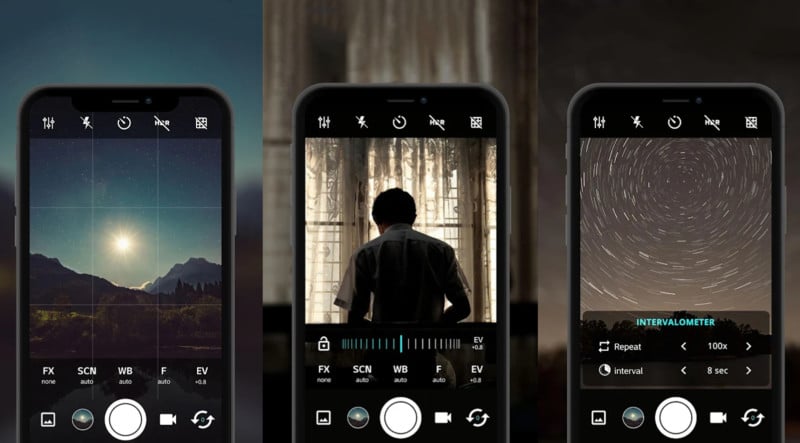
Best Android Camera App
Total:40
Sick of ads popping up mid-photo? Grab Android’s top ad-free camera apps here! They pack pro features—manual focus, HDR+, night mode, and raw editing—no interruptions. Capture crisp shots, edit smoothly, and save without delays.


-
Tuber Tools - Grow Your Channel Easily
Tools | 11.10MB
Tuber Tools - Grow Your Channel Easily is a lightweight mobile utility built for YouTube creators who are just starting out or managing small channels. Instead of juggling multiple websites or browser extensions, this application centralizes four essential tasks: saving video thumbnails, extracting tags from existing content, planning future video topics, and generating QR codes for channel sharing. Its core advantage lies in simplifying routine research and organization tasks that often overwhelm new creators. Unlike full-featured analytics suites, this tool focuses purely on practical, everyday needs rather than complex data dashboards.
-
Mushroom Identify - Automatic
Tools | 79.99MB
Mushroom Identify - Automatic is a practical companion for foragers and nature lovers who want quick, reliable mushroom recognition from a simple photo. The application uses advanced image analysis to identify over 900 species, making it easier to learn about fungi you encounter during walks or trips. Beyond identification, the software includes a weather-driven prediction tool that estimates the best times to hunt for popular varieties like ceps and chanterelles. A built-in map feature lets you log the exact locations where mushrooms were found, turning each outing into a growing personal database. This combination of instant ID, environmental forecasting, and location tracking sets it apart from basic plant recognition tools, offering a more focused experience for mushroom enthusiasts.
-
AnonyTun
Tools | 9.02MB
AnonyTun is a free VPN tool designed for users who need unrestricted access to the internet in regions with heavy censorship or firewalls. It allows you to bypass geo-blocked services and browse securely without any registration or configuration hassles. The application supports SSL, HTTP, and TCP tunnel protocols, ensuring reliable encrypted connections for everyday browsing, streaming, or work. Its main appeal lies in combining simplicity with powerful tunneling capabilities, making it a practical choice for both casual users and those with advanced networking needs. This software stands out by offering unlimited bandwidth and a single-tap connection, removing common barriers found in similar tools.
-
SV3C
Tools | 11.16MB
SV3C is a dedicated mobile viewing application designed specifically for HX series security cameras. It transforms your smartphone into a remote monitoring station, allowing you to keep an eye on your property from anywhere with an internet connection. The core functionality includes real-time video streaming, snapshot capture, and two-way audio support. Unlike generic camera apps, SV3C provides direct PTZ (pan, tilt, zoom) control for compatible hardware, ensuring smooth and responsive camera movement. The software also supports local video playback directly from the camera’s TF card, eliminating the need for additional cloud subscriptions for basic storage access. This combination of hardware-specific optimization and straightforward controls makes it a practical choice for home and small office surveillance setups.
-
 Crosshair Hero
Tools | 12.16MB
Crosshair Hero is a lightweight overlay tool designed for mobile gamers who want to improve their aim in first‑person shooter (FPS) games. Unlike bulky screen‑recording apps, this software places a clean, customizable pointer on top of any running application, including games, without interfering with touch controls. With over 30 pre‑loaded pointer styles and the ability to import your own PNG files, it offers flexibility that few competing tools provide. The core positioning focuses on simplicity: no root access required, no ads disrupting gameplay, and instant activation from a floating widget. Crosshair Hero appeals to both casual players looking for a quick visual aid and competitive gamers who demand precise, adjustable crosshairs. Its unique competitiveness lies in combining a huge style library with full color, size, and position controls, all within a tiny app footprint.
-
 LGMV-Business
Tools | 37.54MB
For HVAC service professionals working with LG equipment, LGMV-Business is a specialized diagnostic and monitoring tool designed to replace guesswork with precision. This application connects to LG air conditioning systems via a dedicated Wi-Fi module, providing engineers with a real-time dashboard of operational data. Unlike general maintenance apps, this tool offers deep technical insights like refrigeration cycle interpretation and pressure graphing. It serves as a portable troubleshooting station, helping technicians quickly identify system faults and validate repairs on-site, making it an essential utility for certified LG service engineers.