
Camera51 - a smarter camera
No AdsSafePersonal Test


What type of app is Camera51 - a smarter camera:
Camera51 is an innovative photography app designed to elevate smartphone photography through AI-powered composition guidance. Unlike standard camera apps, it uses smart framing tools and real-time analysis to help users capture perfectly balanced shots, making it ideal for beginners and enthusiasts seeking pro-level results effortlessly.
Features of Camera51:
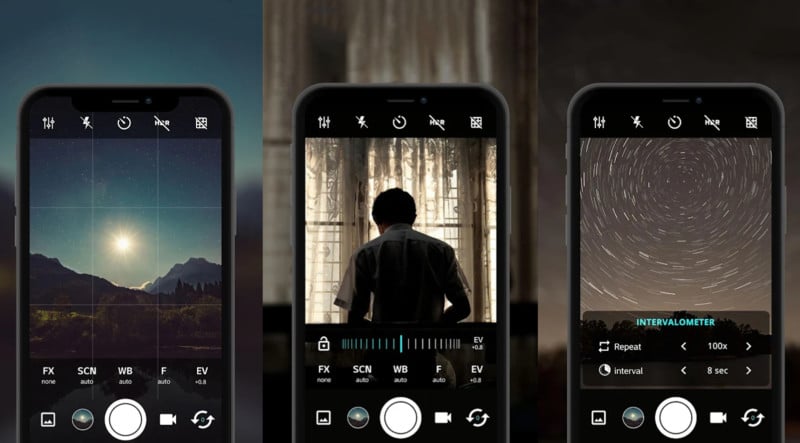
• Auto-Framing Assistant: Overlays dynamic grids and guides to align subjects with the rule of thirds, golden ratio, or symmetry.
• Scene Optimization: Automatically adjusts focus, exposure, and contrast based on detected lighting and subject type.
• Portrait Enhancer: Highlights facial features and backgrounds for flattering selfies or group photos.
• Smart Object Recognition: Identifies horizons, faces, and moving objects to prevent blurry or tilted shots.
• Manual Controls: Optional sliders for advanced users to tweak ISO, shutter speed, and white balance.
Tips for Using Camera51:
1. Hold your phone steady until Camera51 - a smarter camera’s framing guide turns green, indicating optimal alignment.
2. Use the “Portrait Mode” for close-ups—it softens backgrounds while keeping subjects sharp.
3. Enable gridlines in settings to master symmetry and balance in landscapes or architecture shots.
4. Experiment with manual controls in low-light scenarios for crisper night photography.
Why Use Camera51 - a smarter camera APK Mobile
Camera51 bridges the gap between casual snapping and intentional photography. Its AI-driven tools eliminate guesswork, ensuring even novices can capture Instagram-worthy shots without tedious editing. Camera51 - a smarter camera’s emphasis on composition over filters makes it a standout for users aiming to improve their photography skills organically.
Conclusion:
Camera51 - a smarter camera isn’t just another photo app—it’s a pocket-sized mentor for anyone tired of crooked horizons or poorly framed shots. Whether documenting daily moments or creating content, Camera51 - a smarter camera transforms your phone into a smarter, more intuitive camera. Download it to turn every shot into a masterpiece, no expertise required.
- Category:Photography
- Latest Version:1.1.7
- Requirements:android
- File size:17.65MB
- Package lD:com.camera51.android
- Publisher:Camera51
Best Android Camera App
Total:40
Sick of ads popping up mid-photo? Grab Android’s top ad-free camera apps here! They pack pro features—manual focus, HDR+, night mode, and raw editing—no interruptions. Capture crisp shots, edit smoothly, and save without delays.


-
 Facial Symmetry Pro
Photography | 12.85MB
Facial Symmetry Pro is a straightforward tool designed for anyone curious about the balance of their facial features. Instead of complex medical analysis, this application focuses on delivering a fun, quick visual check using your own photos. It combines a simple user interface with practical editing options, allowing you to align a picture with horizontal and vertical guides. The core appeal lies in its single-screen output, which makes comparing the left and right sides of your face easy and immediate. This makes the app ideal for casual social sharing or personal curiosity, standing out from other face-analysis tools by keeping the entire process simple and entertaining.
-
 Mo-View
Photography | 11.45MB
Mo-View is a specialized wireless image transmission assistant designed for real-time viewing of camera feeds from WiFi-enabled inspection devices. Its primary use case is in the endoscopic and industrial inspection sector, where operators need a clear, low-latency live view on a mobile screen. The core functions include live camera preview, video recording, playback of captured media, and direct adjustment of WiFi device parameters like resolution and brightness. Unlike generic camera apps, this tool is purpose-built for the endoscopic workflow, offering a streamlined interface that prioritizes image clarity and stable connectivity over unnecessary editing features. This focused approach makes it a reliable companion for technicians and DIY users alike.
-
 Meitu AI
Photography | 242.08MB
Meitu Wink is a mobile video editing application designed to simplify the process of enhancing and retouching video content directly from your smartphone. Unlike traditional editing software that requires a steep learning curve, this tool focuses on delivering professional-grade beautification effects, including skin smoothing, facial feature adjustments, and body reshaping, all through an intuitive interface. The app also integrates dynamic transitions, AI-powered filters, and real-time preview capabilities, making it a versatile choice for social media creators and casual users alike. Its core strength lies in combining advanced AI algorithms with user-friendly controls, allowing anyone to produce polished, film-like videos without prior editing experience. This positions Meitu Wink as a practical alternative to desktop-based suites for on-the-go content refinement.
-
 Polaroid
Photography | 71.45 MB
Polaroid brings the classic instant photography experience into the digital age, offering a dedicated space for shooting, scanning, and sharing analog pictures. Whether you own a modern Now+ camera or simply love the look of vintage film, this app lets you connect with a global community of instant photo enthusiasts. Core features include a high-resolution scanner for digitizing prints, remote camera controls for advanced modes like double exposure and light painting, and the ability to print phone photos as real Polaroid pictures. By blending physical film with smart digital tools, Polaroid stands out as the essential companion for anyone who values tangible, imperfect memories over perfect digital shots.
-
 PicCollage Beta
Photography | 87.81 MB
PicCollage Beta gives you early access to the newest photo editing and collage features before they reach the stable version. Designed for quick, creative photo arrangements, this app combines grid layouts, freestyle scrapbooking, and a rich sticker library into one intuitive tool. Whether you want to make a custom Instagram story or a themed greeting card, PicCollage Beta stands out by offering experimental tools like Doodle and GIF integration that competing apps often lack. Its core strength lies in blending speed with creative freedom for everyday users.
-
 Photo Snap
Photography | 16.38 MB
Photo Snap helps you organize, edit, and share your phone photos in a simple way. It lets you create photo albums and slideshows with transition effects and background music. The app also supports wireless file transfers between devices running the same software. With editing tools like contrast, brightness, blur, sepia, and sketch effects, you can enhance images quickly without losing originals. Photo Snap stands out because it keeps edited copies separate from your camera roll, making it easy to manage storage. Whether you want to send photos via email, upload to social networks, or sync with a PC, this tool covers all basic needs for everyday photo management.